
SunupAlarm clock with games for Android
The alarm clock you switch off by beating a game
When Sunup rings, tap Start and play a few quick rounds: a sum, a pattern, a memory game. Each takes seconds once you’re awake, and just enough focus that you can’t do it half asleep. By the time the alarm goes quiet, you’re up.
Coming soon to Google Play
Sunup is being tested now, and arrives on Google Play soon.
- 7 days free
- No ads
- No account
- Works offline
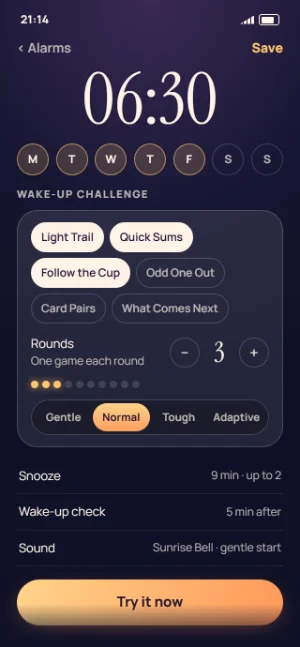
How it works
How the games stop the alarm
If you sleep through alarms, or switch them off without really waking up, a game is much harder to dodge than a button. Sunup keeps ringing until you have played your rounds.
-
It rings, properly
On time, over the lock screen and through silent mode. The time is the biggest thing on the screen, with a big Start button under it.
-
Tap Start and play
The sound drops while you play (or stays loud, or goes silent: you choose). Each round is one short puzzle, about 10 to 20 seconds once you’re awake.
-
Stop, and it gets loud again
Put the phone down mid-game and the sound comes back to full after a few seconds without a touch: 5, 10 or 20, as you set it.
-
You’re up
After the last round the alarm stops. You see how long it took (“Up in 41 seconds”), your streak, your morning score and the note you left yourself last night.
Hard to do half asleep, but never a trap
A mistake costs a few seconds, never a restart: the board shakes, shows you the answer for a moment, and gives you a fresh puzzle. After three misses in a row, the next puzzle is a step gentler.
And if you really can’t play, there is a way out. As standard, after 2 minutes of ringing, “Can’t play right now?” lets you stop the alarm by typing a long phrase. For each alarm you can make it Strict, with no way out but the game, or Easy: hold a button for 5 seconds.
Rings every time
An alarm you can count on, morning after morning
Ringing comes before every other feature in Sunup. Free or Premium, every alarm rings the same way: nothing about ringing is ever behind the paywall.
- Real alarm-clock alarms: on time, over the lock screen, through silent mode.
- Still rings after the phone restarts overnight, even before you unlock it.
- Still rings after an app update, a change of time or a trip to another time zone.
- The sound starts at once, before any screen, and never waits for the game to load. If the game screen can’t open, a simpler challenge appears instead.
- During a phone call it rings softly, then fully once the call ends.
“Will it ring?”
Sunup’s own test sets an alarm for one minute ahead, asks you to lock the phone and wait, then tells you that it passed, or exactly what to fix. It checks every permission Sunup needs and your phone maker’s battery settings too.
If a phone setting could stop an alarm ringing, a banner on the Alarms screen tells you, and the setup guide shows the steps for Samsung, Xiaomi, Huawei, OnePlus, Oppo, Vivo, Motorola and Pixel phones.
An honest note: if you force-stop Sunup, Android cancels its alarms, and no app can prevent that. Open Sunup again and they are all put back. More about force stop
The games
Seven wake-up games: quick to understand, hard to play asleep
Each game is clear in two seconds. The challenge is in paying attention, not in tricky rules. Choose the games you like for each alarm, play one game every round, or let Sunup mix them.
-
Free
Quick Sums
Answer a few sums on a big keypad, from single digits on Gentle to times tables on Tough.
-
Free
Light Trail
Watch the tiles light up one after another, then tap them back in the same order.
-
Free
Odd One Out
Spot the one that is different. Tougher levels have more to look through, and subtler differences.
-
Free
Type it
Type a short phrase you see on the screen: a few words on Gentle, a whole line on Tough.
-
Premium
Follow the Cup
Watch the ball go under a cup, keep your eye on that cup as the cups swap, then tap it.
-
Premium
Card Pairs
Take a quick look at the cards, then turn them over two at a time to find the matching pairs.
-
Premium
What Comes Next
Find the pattern and pick what comes next: one simple rule on Gentle, three at once on Tough.
-
Every game
Gentle, Normal, Tough or Adaptive
Every game has three levels. Adaptive (Premium) picks the level each morning, to keep the time it takes you to get up close to a target you choose: about 30, 45, 60 or 90 seconds.
Per-alarm settings
Make every alarm your own
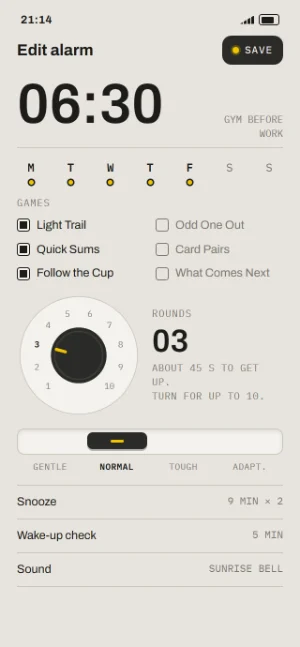
A gentle alarm for Sunday and a tough one for the early shift: every alarm has its own wake-up challenge and its own rules, along with its time, repeat days and label. New alarms start from the defaults you choose in Settings.
Try it now plays an alarm’s challenge at its settings, quietly, so you know what tomorrow morning holds.
- Games
- Pick any games, one game every round, or Mix: a different game each round. Free: 4 games
- Rounds
- From 1 to 10. Free: 1 to 3
- Difficulty
- Gentle, Normal, Tough or Adaptive, with Adaptive’s target time to get up. Tough and Adaptive: Premium
- Mistakes
- A fresh puzzle in the same round, or a mistake adds a round. Adds a round: Premium
- Sound while you play
- Keep it loud, make it quieter, or silence it while you touch the screen. It comes back loud after 5, 10 or 20 seconds without a touch.
- Snooze
- Off, or 1 to 30 minutes, up to 5 times in a row. Earn your snooze makes snoozing take a round too. Earn your snooze: Premium
- Wake-up check
- 3, 5 or 10 minutes after you’re up, the phone asks “Still up?”. Miss it, and the alarm rings again with one round. Premium
- Emergency way out
- Standard (after 2 minutes, type a long phrase), Strict (no way out but the game) or Easy (hold a button for 5 seconds).
- Sound
- Sounds that start soft and grow, with the volume, a gentle start (off, 30 or 60 seconds) and vibration. Sunup Premium adds 20 more sounds, and your own sound file. Free: 10 sounds
- Stop ringing after
- 10, 20 or 30 minutes, or never.
- Note to yourself
- A line for the morning, shown when you’re up: “Bins out”, “Pack your boots”.
- Skip next
- Skip just the next ring of a repeating alarm, for a day off, and it carries on after.
Three looks
Three looks, all free: wake up to the one you like
Choose a look when you set Sunup up, and change it whenever you want in Settings, under Look. Whichever you pick, the ringing screen starts dim and warm at night and gets brighter as you finish each round.
-
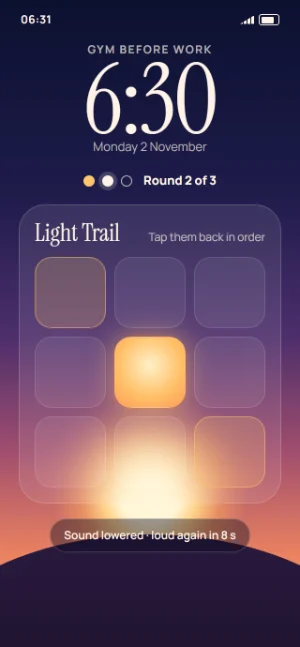
SunupA night sky that brightens as you finish each round, with frosted glass and an elegant serif clock. Always dark. -
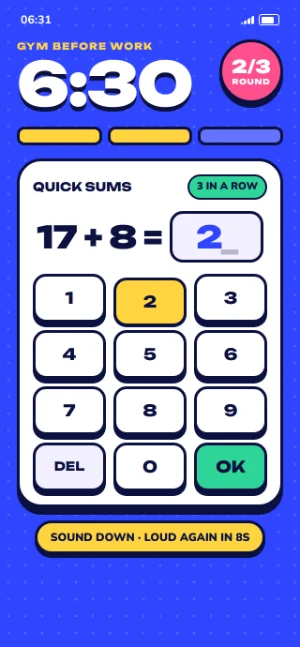
ArcadeBold, chunky and colourful, with thick outlines and keys that press down. A bright day palette and a navy night one. -
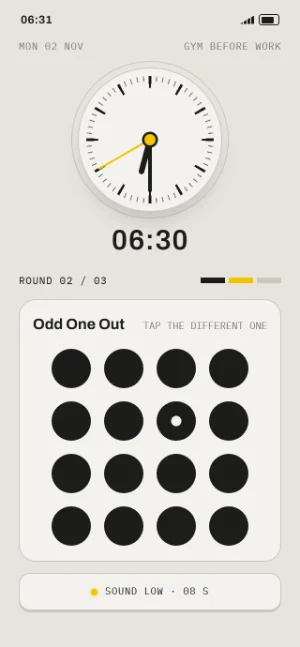
StudioCalm and precise, after classic alarm clocks, with a real dial and one yellow accent. Light matte by day, charcoal at night.
Arcade and Studio follow your phone’s light or dark setting. The pictures on this page come from Sunup’s designs, and the finished app may differ a little.
Mornings
See how your mornings are going
Sunup keeps a quiet record of your mornings, on your phone: your streak, how quickly you get up on average, your best time in each game, and a calendar of your mornings.
- Morning score, from 0 to 100: mostly how quickly you got up compared with your own average, plus how many answers were right.
- Streak: the mornings in a row on which you got up, and answered the wake-up check if it was on. A snooze doesn’t break it.
- A share card, if you like: a picture of the time, your morning score and your streak, and nothing else, sent through Android’s share menu.
About getting up, not about sleep
Sunup doesn’t track your sleep, and it can’t listen to you at night: it has no permission to use the microphone. Mornings only knows when your alarms rang and how you got on.
The last 7 days of Mornings are free. Sunup Premium shows your full history, and more share card styles.
Free and Premium
7 days of everything, free. No card needed.
The free trial starts the first time one of your alarms rings, not when you install, so setting Sunup up and testing it doesn’t use any of it. After the 7 days, Sunup stays a proper alarm clock for good, free.
-
The free trial
7 days free
- Everything in Sunup, Premium included, from the first alarm that rings.
- No card, no sign-up, nothing to cancel. Nothing is charged when it ends.
- The “Will it ring?” test and Try it now don’t count.
-
Free for good
A real alarm clock, free
- Unlimited alarms, and every reliability feature.
- Quick Sums, Light Trail, Odd One Out and Type it.
- 1 to 3 rounds, at Gentle or Normal.
- Snooze rules and the emergency way out.
- 10 sounds and all three looks.
- The last 7 days of Mornings.
-
Sunup Premium
Monthly or yearly
- Every game, and new ones as they arrive.
- Up to 10 rounds, Tough and Adaptive.
- Mistakes that add a round, and snoozes you earn.
- The wake-up check.
- All 30 sounds, and your own sound file.
- Your full Mornings history, and more share card styles.
Paid through Google Play, which shows the price in your currency before you pay. Cancel any time in Google Play.
Free or Premium, every alarm rings the same way. There are no ads, ever, whether you pay or not. Our terms of use explain the free trial and Premium plainly.
Privacy
A wake-up alarm with no ads and nothing to sign up for
- No ads of any kind, ever: no banners, no videos, and never an ad to watch before you can snooze.
- No account to make. Open the app and set your alarm.
- No analytics and no tracking. We never sell anything about you.
- Your alarms, settings and mornings stay on your phone. We don’t have a copy, and we can’t see them.
Sunup can’t go online at all.
Sunup doesn’t have Android’s permission to use the internet, so it has no way to send anything anywhere. When you buy Sunup Premium, the Google Play Store app on your phone talks to Google for it.
Android’s own backup to your Google account and Google Play billing are run by Google, and we can’t see either.
Questions about Sunup
How does an alarm clock with games work?
When Sunup rings, you tap Start and play a few short rounds of a game, such as a sum, a pattern or a memory game. The sound drops while you play and comes back loud if you stop. When you finish the last round, the alarm stops. A mistake costs a few seconds, never a restart.
Is Sunup good for heavy sleepers?
Sunup is made for people who sleep through alarms, or switch them off without really waking up. One sleepy tap can’t stop it: you have to play, and each game needs just enough focus that you can’t do it half asleep. For a tougher start, Sunup Premium adds more rounds, the Tough level, a wake-up check a few minutes later and snoozes you have to earn.
Does Sunup have ads?
No. Sunup has no ads of any kind, and never will, so there is never an ad to watch before you can snooze. There is no tracking either: no analytics, and no account to make.
Is Sunup free?
Sunup is free to download. Everything in it is free for 7 days from the first time one of your alarms rings, with no card needed. After that, the free version keeps unlimited alarms, every reliability feature, four games, up to three rounds and all three looks. Sunup Premium, an optional monthly or yearly subscription through Google Play, adds every game, up to ten rounds, the Tough and Adaptive levels, the wake-up check, the full sound library and your full history. Our terms of use explain it plainly.
Will Sunup ring if my phone is on silent?
Yes. Sunup rings on the phone’s alarm sound, which plays through silent mode. Do Not Disturb lets alarms through unless it has been set to block them, so check its settings if you have changed them. While an alarm rings, Sunup sets the alarm volume to the level you chose for it, and puts your own level back afterwards.
Will my alarm ring if my phone restarts overnight?
Yes. Sunup puts every alarm back after a restart, even before you unlock the phone, and after an app update or a change of time or time zone. If the phone hasn’t been unlocked since it restarted, the game screen can’t open yet, so the alarm rings with a simpler challenge instead, such as typing a short phrase or a few sums.
What if I can’t play the game? Is there a way out?
Yes. With the standard way out, a “Can’t play right now?” link appears after 2 minutes of ringing: type a long phrase and the alarm stops. For each alarm you can choose Strict instead, with no way out except finishing the game, or Easy, where holding a button for 5 seconds stops it. An alarm also stops by itself after the time you set, 10, 20 or 30 minutes, unless you choose never.
What happens if I force-stop Sunup?
Android cancels an app’s alarms when it is force-stopped, and no app can prevent that. On some phones, “Clear all” in the recent apps or a cleaning app does the same. Open Sunup again and every alarm is put back. Our phone setup guide shows how to stop your phone doing it by itself.
Does Sunup need the internet?
No. Sunup works fully offline. It doesn’t even have Android’s permission to use the internet. Your alarms, settings and mornings stay on your phone.
Does Sunup track my sleep?
No. Sunup is an alarm clock, not a sleep tracker. It doesn’t watch or listen to you at night, and it has no permission to use the microphone or your movement. Mornings only records when your alarms rang and how quickly you got up.
Can I use my own sound?
Yes, with Sunup Premium. Choose any sound file on your phone with Android’s own file picker. Sunup only sees the file you choose, needs no permission to read your files, and the file stays on your phone. Sunup’s own sounds, 10 free and 30 with Premium, all start soft and grow.
Which phones does Sunup work on?
Android phones with Android 8.0 or newer. Most work as they are. A few phone makers’ battery savers need a setting changed, and Sunup shows you how. There is no iPhone version at the moment.
When can I get Sunup?
Sunup is being tested now, and arrives on Google Play soon, for Android phones with Android 8.0 or newer. This page will link to it as soon as it’s there.
Made by Kindly Made
Sunup is made by Kindly Made, a small, independent maker of calm, honest apps, based in South Africa. Its wake-up games come from Spry, our brain games app, retuned for the first minute of the day. Like Spry and Site Diary, it has no ads and no tricks, and it keeps your information on your phone.
Ideas, problems, or a game you would love to wake up to? Write to us at support@kindlymadeapps.com. We read every message.