
TeeTraceGolf shot tracer for Android
Trace your golf shots like on TV, free on Android
TeeTrace is a free golf shot tracer app for Android. Pick a swing video, and it finds the strike, follows the ball and draws a glowing, TV-style tracer along its flight. Then save the clip with the trace in it, ready to share.

Free, for phones with Android 10 or newer.
How TeeTrace traces a golf shot
From a swing video to a clip worth sharing, in four steps.
-
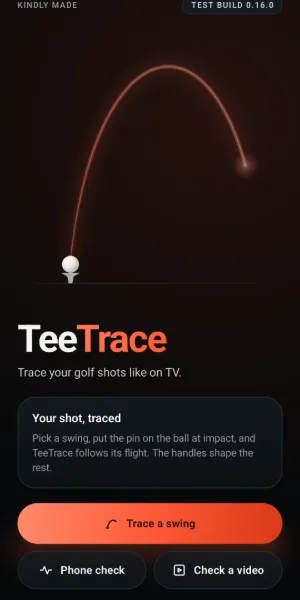
Pick a swing
Choose a swing video from your gallery: one you filmed with your phone’s camera today, or an old favourite. Your phone’s slow-motion videos work too.
-
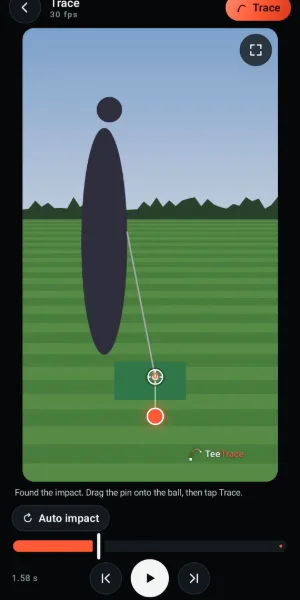
TeeTrace finds the strike
It listens for the club meeting the ball, checks that moment against the swing’s movement, and jumps to it. Then you put the pin on the ball: it sits just off your fingertip, with a magnifier, so you see exactly where it goes.
-
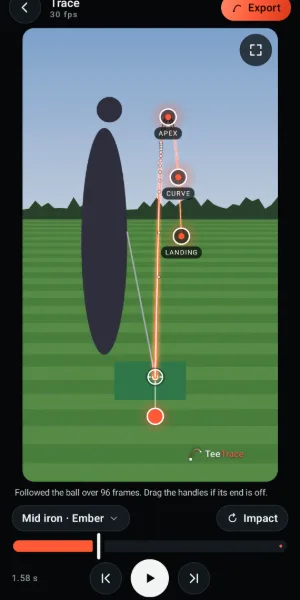
Tap Trace
TeeTrace follows the ball through the frames after impact and fits its flight to what it saw. The trace sits on the ball wherever you can see it, and carries on to where it comes down. Drag the handles to shape the apex, the curve or the landing if you want it just so.
-
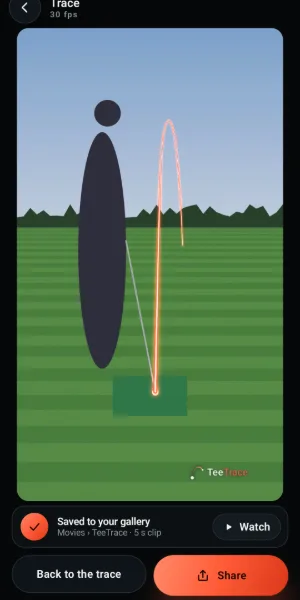
Save and share
Export the clip with the trace burned in. It’s saved to your gallery, in Movies › TeeTrace, ready for WhatsApp, Instagram or TikTok.
The pictures on this page show TeeTrace on a drawn test clip, not a real swing.
Automatic, with you in charge
TeeTrace does the finding and the following for you, and every step stays in your hands.
- It finds the impact by sound and movement, and jumps straight to it. You can always step a frame either way.
- It follows the ball after impact, works out where your phone was, and shows dots where it saw the ball.
- It always gives you a trace. If it can’t find the ball, it starts from a typical shot for your club, from driver to wedge, and you shape the rest.
- Handles for the landing, the apex, and a draw or a fade.
- Full screen and frame-by-frame steps, for your phone’s slow-motion clips too.
- Three tracer looks: Ember, Solar and Ice.
No made-up numbers
TeeTrace draws your ball’s flight; it doesn’t measure it. Without a launch monitor, carry, ball speed and spin would be guesswork, so you won’t find those numbers in TeeTrace.
What you get is the shot you hit, traced on your own video, to watch back and to share.
Free, with a small watermark
TeeTrace is free, with no ads and nothing to sign up for. Finding the impact, following the ball, shaping the trace and exporting your clip are all in the free version.
Clips you export from the free version carry a small TeeTrace mark in the corner, like the one you can see in the pictures on this page.
Private by design
Your swing videos stay on your phone.
- No internet permission: TeeTrace has no way to send anything anywhere.
- No account to make, and nothing to sign in to.
- No ads, no analytics and no tracking.
- TeeTrace sees only the videos you pick, and needs no permission to read your photos or files.
- A clip leaves your phone only when you share it yourself.
TeeTrace can’t go online at all.
It doesn’t have Android’s permission to use the internet. It traces your swing on your phone and saves your clips to your own gallery. We never see them.
How to film a swing for the best trace
TeeTrace works on any swing video. These make the ball easiest to follow.
-
Film down the line
Stand behind the golfer and point the phone along the target line, so the ball flies away from the camera.
-
Keep the phone still
A tripod is best, or prop the phone against your bag. If you hold it, use both hands and keep still through the shot.
-
Start with the ball in view
Start filming before the swing, with the ball in the picture. TeeTrace looks at it there to work out how far away your phone is.
-
Leave the sound on
TeeTrace listens for the strike to find the moment of impact.
-
Use slow motion if you have it
More frames give TeeTrace more chances to see the ball. Your phone’s own slow-motion mode works.
-
Pick a darker background
Trees or a hedge behind the ball’s flight make it easier to follow than a bright, empty sky.
One swing in each video works best.
Questions about TeeTrace
Is TeeTrace free?
Yes. TeeTrace is free, with no ads and nothing to sign up for. Clips you export from the free version carry a small TeeTrace mark in the corner.
How does a golf shot tracer app work?
TeeTrace first finds the frame where the club meets the ball, by listening for the strike and checking it against the movement in the swing. You put the pin on the ball, and TeeTrace follows the ball through the frames after impact, fits a flight to what it saw, and draws a glowing tracer along that flight on the video itself. The handles let you shape the apex, the curve and the landing.
Does TeeTrace track the ball automatically?
Yes. After you tap Trace, TeeTrace follows the ball by itself and shows dots where it saw it. If it can’t find the ball, for example against a bright sky, you still get a trace: a typical shot for the club you picked, which you shape with the handles to match where your ball went.
Can I trace videos I’ve already filmed?
Yes. TeeTrace works on swing videos already on your phone, filmed with your phone’s camera, slow-motion videos included. You pick one with Android’s photo picker, and TeeTrace sees only the video you choose.
Does TeeTrace show distance, ball speed or spin?
No. TeeTrace draws your ball’s flight on the video; it doesn’t measure it. Without a launch monitor those numbers would be guesswork, so TeeTrace doesn’t show them.
Does TeeTrace need the internet or an account?
No. TeeTrace works offline, and doesn’t even have Android’s permission to use the internet. There’s no account to make, and your videos stay on your phone unless you share them yourself. Our privacy policy explains it in plain words.
Where do my traced clips go?
To your phone’s gallery, in Movies › TeeTrace. Share them from there, or straight from TeeTrace, to WhatsApp, Instagram, TikTok or anywhere else.
Is TeeTrace on iPhone?
No. TeeTrace is made for Android phones with Android 10 or newer. There is no iPhone version at the moment.
Where can I get TeeTrace?
TeeTrace is free to download from Google Play, for Android phones with Android 10 or newer.
Made by Kindly Made
TeeTrace is made by Kindly Made, a small, independent maker of calm, honest apps, based in South Africa. Like Spry, Site Diary and Sunup, it has no ads and no tricks, and it keeps your information on your phone.
TeeTrace is new. Tell us how it does on your swings at support@kindlymadeapps.com. We read every message.