BowlSightBowling ball tracker for Android
A bowling ball tracker on your Android phone
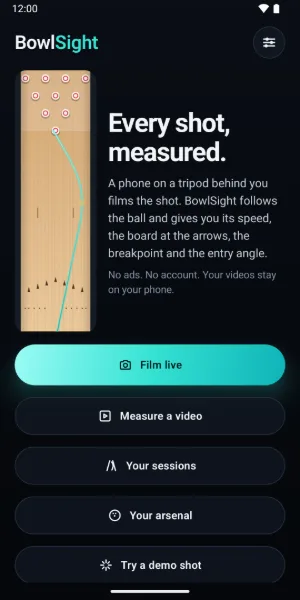
BowlSight films your shots from a tripod behind you, follows the ball down the lane, and gives you the numbers league bowlers care about: its speed, the board at the arrows, the breakpoint, and the board and angle it comes into the pins. No sensor on your ball, nothing to plug into the lanes.
Free to download, for phones with Android 10 or newer.
What BowlSight measures on every shot
The numbers you’d otherwise have to guess, worked out from your own video.
-
Ball speed
Off your hand, on average from the foul line to the pins, and at the pins, in mph or km/h.
-
The board at the arrows
Where the ball crosses the arrows, and the board you laid it down on.
-
The breakpoint
The board where the ball stops heading out and turns for the pocket, and how far down the lane that happens.
-
Entry board and angle
The board the ball reaches the pins on, and how steeply it comes into the pocket.
-
The ball’s path
Drawn on a lane diagram, and every shot of a session together on one lane.
-
The result and the ball
Strike, spare or the pins you left, in one tap, and which ball you threw.
How BowlSight tracks your ball
A phone, a tripod and a few seconds to mark the lane.
-
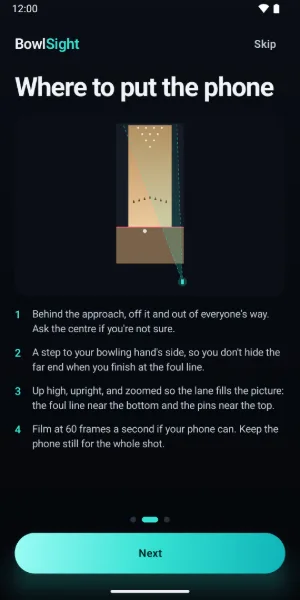
Set the phone up
On a tripod behind the approach, a step to your bowling hand’s side, up high, with the lane filling the picture. Keep off the approach and out of other bowlers’ way, and ask the centre first.
-
Mark the lane once
Drag four rings onto the lane’s corners: the two ends of the foul line, and the lane’s edges level with the head pin. Tell BowlSight the centre and the lane, and it starts there next time.
-
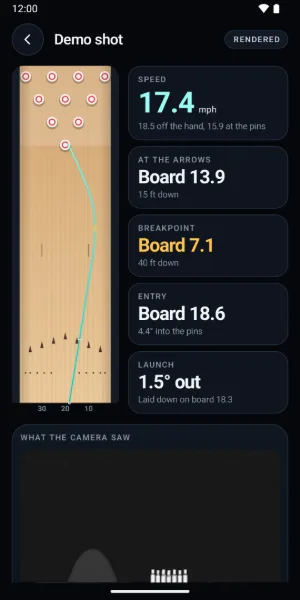
Bowl
Film live, and each shot’s numbers appear a moment after the ball reaches the pins. Or measure a video you’ve already filmed from behind the bowler.
-
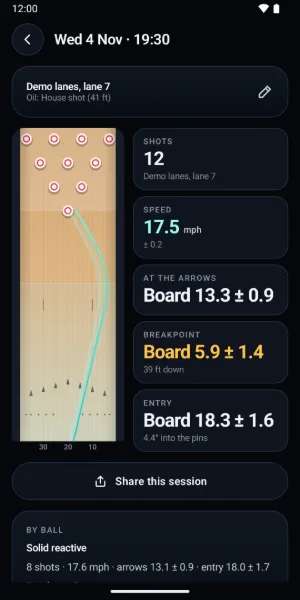
Learn from the session
Every shot is saved with its result and ball. A session shows all your paths on one lane, and how consistent you were at the arrows, the breakpoint and the entry.
The pictures on this page show BowlSight’s built-in demo, not a real bowler’s shots.
Free bowling calculators
Work your numbers out in your browser, without the app.
Your ball
- Ball speed calculatorYour speed from the time to the pins, with a stopwatch or a phone video.
- Rev rate calculatorYour revolutions per minute from a phone video, the way USBC measures it.
- Entry angleWhat it is, why a few degrees matter, and a calculator from your breakpoint.
- Breakpoint and the rule of 31How to read your breakpoint, and where to aim for it on any oil pattern.
Your league
Built for league nights
- Sessions by centre, lane and oil pattern, with your history across them.
- Your arsenal: each ball with its own numbers, across every session and pattern.
- Replays with the ball’s path painted on the lane as it rolls, in slow motion or a frame at a time, to save and share.
- Several bowlers on one phone, for a parent or a coach: each with their own sessions and balls.
- A spreadsheet of every shot, when you want to dig in yourself.
Free, with Premium when you want more
BowlSight is free to download, with no ads. The free version measures every shot’s speed and the board at the arrows, and keeps your last three sessions.
BowlSight Premium adds the breakpoint and the entry, every session with its full numbers, replays, your arsenal and oil patterns, several bowlers and the spreadsheet.
Private by design
Your bowling videos and shots stay on your phone.
- No internet permission: BowlSight has no way to send anything anywhere.
- No account to make, and nothing to sign in to.
- No ads, no analytics and no tracking in the app.
- BowlSight sees only the videos you pick, and needs no permission to read your photos or files.
- A session, a replay or a spreadsheet leaves your phone only when you share it yourself.
BowlSight can’t go online at all.
It doesn’t have Android’s permission to use the internet. It works out every shot on your phone, and we never see your videos or your numbers.
How to film your shots for BowlSight
The clearer BowlSight sees the ball, the better it can follow it.
From behind, up high
Behind the approach, a step to your bowling hand’s side, so you don’t hide the far end of the lane when you finish at the foul line.
Fill the picture with the lane
Upright, and zoomed so the foul line is near the bottom of the picture and the pins near the top.
Keep the phone still
A tripod is best. BowlSight lines each frame up with the lane as you marked it, and warns you if the phone moves too far.
60 frames a second if you can
More frames give BowlSight more looks at the ball on its way down the lane.
Questions about BowlSight
Is BowlSight free?
Yes. BowlSight is free to download, with no ads and nothing to sign up for. The free version measures every shot’s speed and the board at the arrows, and keeps your last three sessions. BowlSight Premium, an optional subscription through Google Play, adds the breakpoint, the entry, replays, your arsenal, oil patterns and more.
How does a bowling ball tracker app work?
You mark the lane’s four corners on a frame of the video once. From then on BowlSight knows where every board and every foot of the lane is in the picture. It finds the ball in each frame, follows it down the lane, maps where it touches the lane onto the boards, and works out the shot’s speed, the board at the arrows, the breakpoint and the entry from that path.
Do I need a sensor or the centre’s equipment?
No. BowlSight uses your phone’s camera, or a video you’ve already filmed. There’s nothing to put on your ball and nothing to connect to the lanes.
Can I measure videos I’ve already filmed?
Yes, if they were filmed from behind the bowler with the whole lane in view. Pick one with Measure a video, mark the lane’s corners on a frame, and BowlSight measures the shot.
How accurate is BowlSight?
BowlSight is new and still being tested on real lanes, so we don’t quote an accuracy figure yet. It does best with the phone steady on a tripod, up high behind the approach, and the whole lane in the picture.
Does BowlSight measure rev rate?
Not yet. Until it does, our free rev rate calculator works yours out from a phone video in a couple of minutes.
Does BowlSight need the internet or an account?
No. BowlSight works offline, and doesn’t even have Android’s permission to use the internet. There’s no account to make, and your videos and shots stay on your phone unless you share them yourself. Our privacy policy explains it in plain words.
Is BowlSight on iPhone?
No. BowlSight is made for Android phones with Android 10 or newer. There is no iPhone version at the moment.
Where can I get BowlSight?
BowlSight is free to download from Google Play, for Android phones with Android 10 or newer.
Made by Kindly Made
BowlSight is made by Kindly Made, a small, independent maker of calm, honest apps, based in South Africa. Like Spry, Site Diary and Sunup, it has no ads and no tricks, and it keeps your information on your phone.
BowlSight is new. Tell us how it does on your lanes at support@kindlymadeapps.com. We read every message.